

Shopify Product Reviews Integration
Get up and running with the ResellerRatings Product Reviews solution for Shopify. This is a very quick process and we can help you out with it, just contact us! We don't have a NATIVE app for shopify yet but will be developing one.
Time to complete - 10 minutes
Dev resources needed - no but can be useful
Overview
There are three main steps:
- Step 1 - Product Catalog Ingestion
Add product metadata to your Shopify product pages so ResellerRatings can recognize your products and variants. - Step 2 - Review Collection
Configure Shopify webhooks so review requests can be triggered after purchase. - Step 3 - Review Display
Add the Product Review Display Widget to your Shopify product pages. - Implementation Checklist
Step 1: Product Catalog Ingestion
Add product metadata to your Shopify product pages so ResellerRatings can recognize your products and variants.
-
- Navigate to your Shopify Admin Panel.
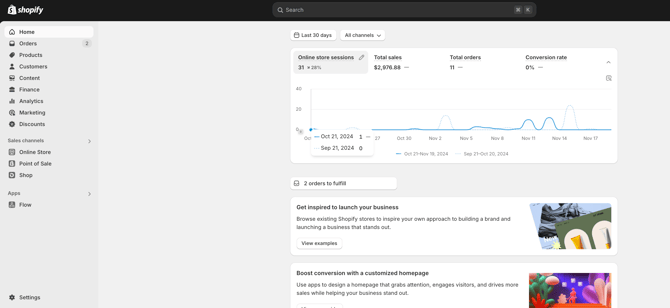
- Click Online Store in the left-hand menu.
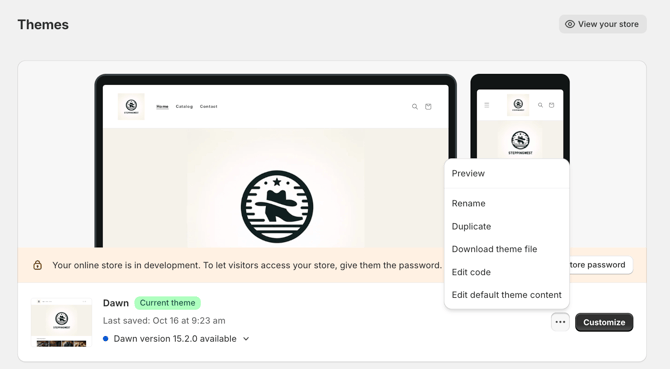
- Click the three dots next to your active theme.
- Select Edit code.
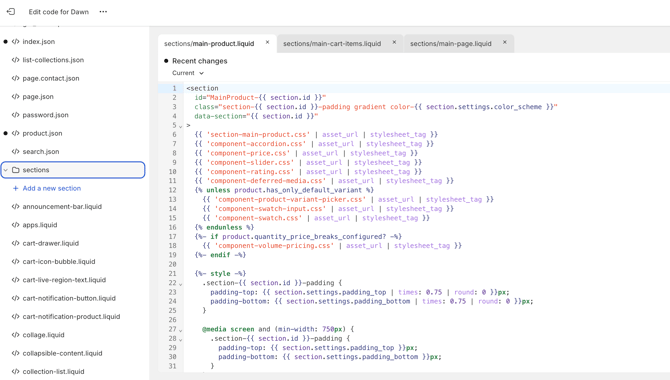
d. In the left-hand file column, locate the template or section file used for your product pages.
Common examples include:
main-product.liquidproduct-template.liquidproduct.liquid- A custom product section file
3. Add the ResellerRatings product catalog script to the product page template
Add the following script to your product page template. Replace YOUR_SEO_NAME with your seller SEO NAME found on your dashboard.
https://replaceme.com - with your shopify domain url
<script>
let variantskus = [];
variantskus.push({sku: "",
name: "",
gtin: "",
img: "",
url: "https://replaceme.com",
parent_id: ""});
var __RRPRWidget_Settings = {
name: "",
sku: "",
gtin: "",
img: "",
url: "https://replaceme.com",
parent_id: "",
products: variantskus,
onclick: function(){
$('html').animate({
scrollTop: $('#RR_PR_Frame_Wrapper').offset().top - 50
}, 700);
document.getElementById('RR_PR_Frame_Wrapper').click();
}
};
</script>
<!--Bottom of your page-->
<script src="https://www.resellerratings.com/productreviews/widget/app/YOUR_SEO_NAME.js?sku="></script>
Confirm the product image variable
The product image variable may differ by theme. Make sure this value correctly outputs the product image URL:
Once these values are updated, the script is ready to use.