
Translations are controlled in the dashboard and can also be returned through the Product Reviews API.
What the feature does
-
Detects the original language of each review
-
Creates translated versions in the languages you’ve selected
-
Makes those translations available:
-
In the dashboard
-
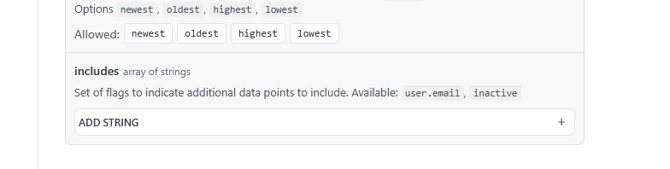
Through the Product Reviews API (via the includes parameter)
- Via the JS on the storefront (coming soon)
-
English is always available. You can add additional languages on top of that.
How Translations Work
We use OpenAI language models to translate review content.
These models detect the original language and generate translated versions in the languages you’ve selected in your dashboard.
Translations happen automatically in the background when new reviews are created.
Each translated version is stored along with the review, so we do not translate the same review repeatedly.
Translated reviews will have a source translation note amended to the review return for transparency
Best Practices
✔ Only enable languages you intend to display
✔ Cache responses when including translations in widgets
✔ Handle cases where certain languages may not yet be translated
✔ Allow users to see original text if needed
🔤 What Gets Translated
Here’s exactly what translation covers today:
|
em |
Status |
Notes |
|---|---|---|
|
📝 Review Text |
✔️ Translated |
Main customer feedback |
|
🏷️ Review Title |
✔️ Translated |
If a title is included |
|
❓ Custom Questions |
❌ Not yet |
Coming in a future update |
|
On-Site Write A Reveiw Form |
❌ Not Yet |
Coming in a future update |
What to Expect
-
Fast translation — most translations are available within a few seconds after the review is submitted.
-
Same tone preserved — OpenAI models are good at keeping the original meaning and sentiment.
-
Not perfect — occasional small errors can happen, especially with slang or very short comments.
-
AI-generated — these translations are not human-edited unless you manually update them.
Output Sample file for API Call
Turn it on in the dashboard
-
Go to Settings → Product Reviews.
-
Click Translations in the left menu.
-
Pick the languages you want from the grid.
-
Click a language tile to turn it on or off.
-
You can enable multiple languages at the same time (subject to your plan / limits shown in the UI).
-
-
Click Save .
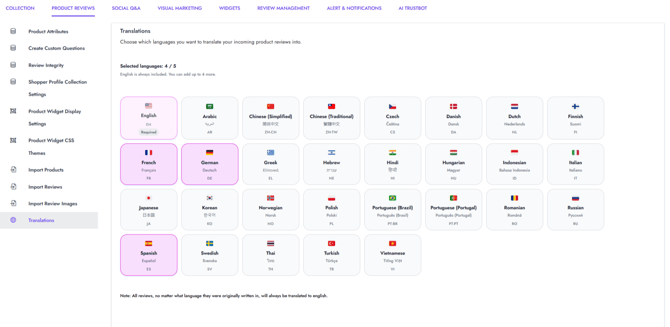
From this point on, new incoming reviews will be translated into the languages you selected.
Note: Changing languages is not retroactive by default. Only new reviews are translated going forward unless otherwise specified in your account configuration.
If you need past reviews translated - contact support to have a look back be done
Using translations with the API
Translations can be returned on any Product API endpoint that supports the includes parameter.
1. Add translations to includes
When calling a product reviews endpoint, pass translations in the includes array.
Example (conceptual):
GET /api/products/{product_id}/reviews?includes[]=translations
Or in JSON (for SDKs / POST-style filters):
{
"includes": ["translations"]
}
This tells the API to attach translation data for each review, based on the languages you’ve enabled in the dashboard.
2. Response shape
When translations is included:
-
Each review will contain translation data in the response.
-
You’ll see translated content for the languages you turned on under Settings → Product Reviews → Translations.
-
The exact field names and structure are documented in the main Product Reviews API reference (under the translations include).
Use this translated content in:
-
Custom widgets
-
Internal tools (support, merchandising, analytics)
-
Any UI where you want to display reviews in a shopper’s preferred language
How it behaves in widgets (current state)
-
Right now, translations are available via the API and can be wired into custom widgets.
-
Native widget-level integration is still being explored.
-
If you’re building your own widget, fetch reviews with includes=translations and choose which language to render.
Notes and limitations
-
Source language: Reviews are always stored in their original language. Translations are an additional layer, not a replacement.
-
Language selection: You control which languages are generated from the dashboard only.
-
Performance: Adding translations to includes will increase payload size. Use it only when needed.
-
Backfill: If you need translations for older reviews, contact support or your account team for options.