
Customizing Your Product Review Layout (One-Column vs Two-Column)
ShopperStream now allows merchants to choose between two different layouts for displaying product reviews on product pages.
This update provides more flexibility in how reviews appear on your storefront and allows you to tailor the review experience to match your store design and customer shopping behavior.
Available Review Layouts
Classic One-Column Layout
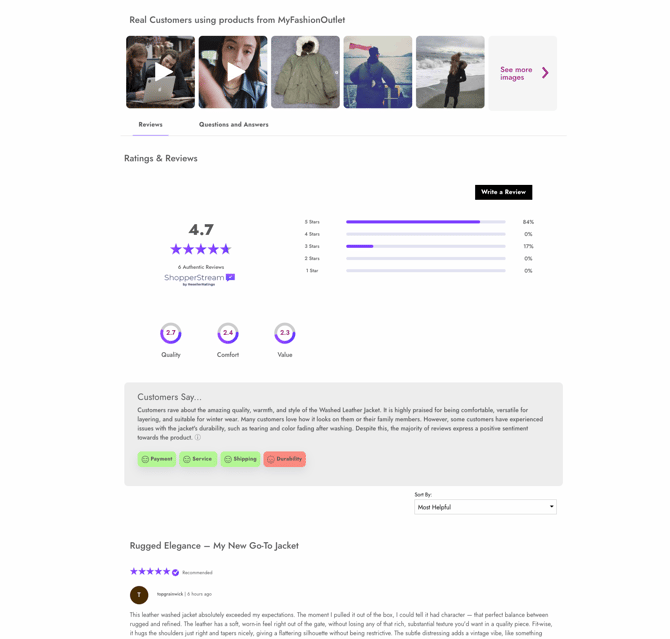
The one-column layout is the original ShopperStream design.
This layout displays reviews in a single vertical stream, focusing primarily on individual customer feedback.
Best for
-
Minimal product page designs
-
Mobile-focused storefronts
-
Stores that want a simplified review experience
Features include:
-
Vertically stacked review feed
-
Customer ratings and written reviews
-
Verified shopper indicators
-
Customer photos and videos
-
Attribute ratings
Two-Column Layout
The two-column layout introduces a more structured review experience.
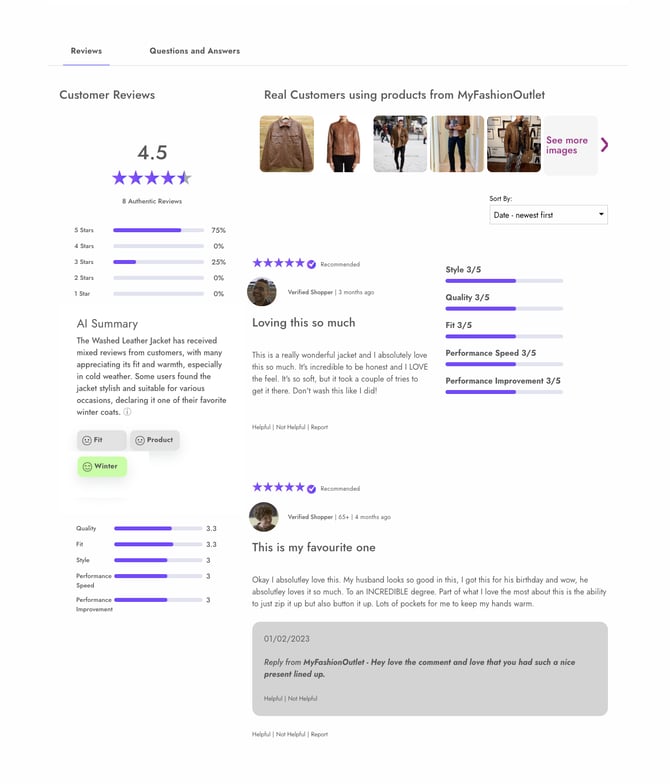
Reviews appear in the main column, while additional insights and aggregated rating data are displayed alongside them. This allows shoppers to quickly scan product feedback and supporting review signals.
Best for
-
Desktop-focused product pages
-
Stores that want to highlight review insights
-
Brands with rich customer content such as photos or videos
The two-column layout helps shoppers see important product signals faster while browsing reviews.
How to Enable the Two-Column Layout
You can enable or switch layouts from the ShopperStream dashboard.
Steps
-
Log in to your ShopperStream Dashboard
-
Navigate to
Dashboard → Product Widget Display Settings
-
Locate Review Layout
-
Select your preferred layout:
-
One-Column
-
Two-Column
-
-
Save your settings
Changes will update automatically on your product pages.
You can switch between layouts at any time.